Water Readings & LSI Calculator
Proper water chemistry is essential for pool health. PoolOps makes it easy to record readings and understand what adjustments are needed.
Taking Water Readings
What to Test
At each service stop, test and record:
| Reading | Ideal Range | Why It Matters |
|---|---|---|
| pH | 7.2 - 7.6 | Affects sanitizer effectiveness and swimmer comfort |
| Free Chlorine | 1 - 3 ppm | Kills bacteria and algae |
| Total Chlorine | 1 - 3 ppm | Free chlorine + combined chlorine |
| Alkalinity | 80 - 120 ppm | Buffers pH and prevents swings |
| Calcium Hardness | 200 - 400 ppm | Prevents equipment corrosion |
| Cyanuric Acid (CYA) | 30 - 50 ppm | Protects chlorine from UV degradation |
| Temperature | Varies | Affects chemical reactions and LSI |
Entering Readings in the App
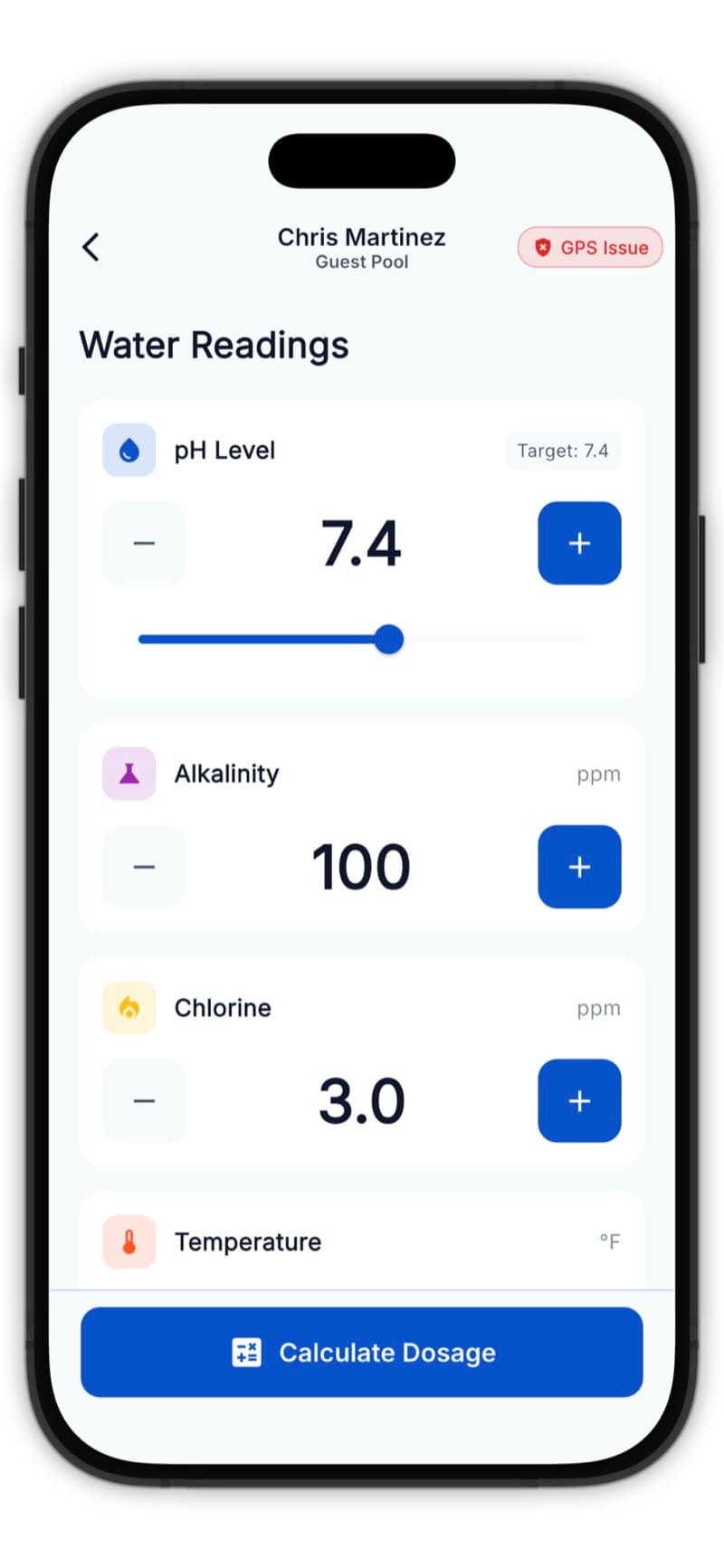
- Start a service stop
- On the Water Readings screen, enter each value
- Tap fields to input numbers using the keypad
- The app validates readings and warns if values seem unusual
You can skip readings you didn't test - the LSI will calculate with available data.
Understanding LSI (Langelier Saturation Index)
The LSI tells you if water is balanced, corrosive, or scale-forming.
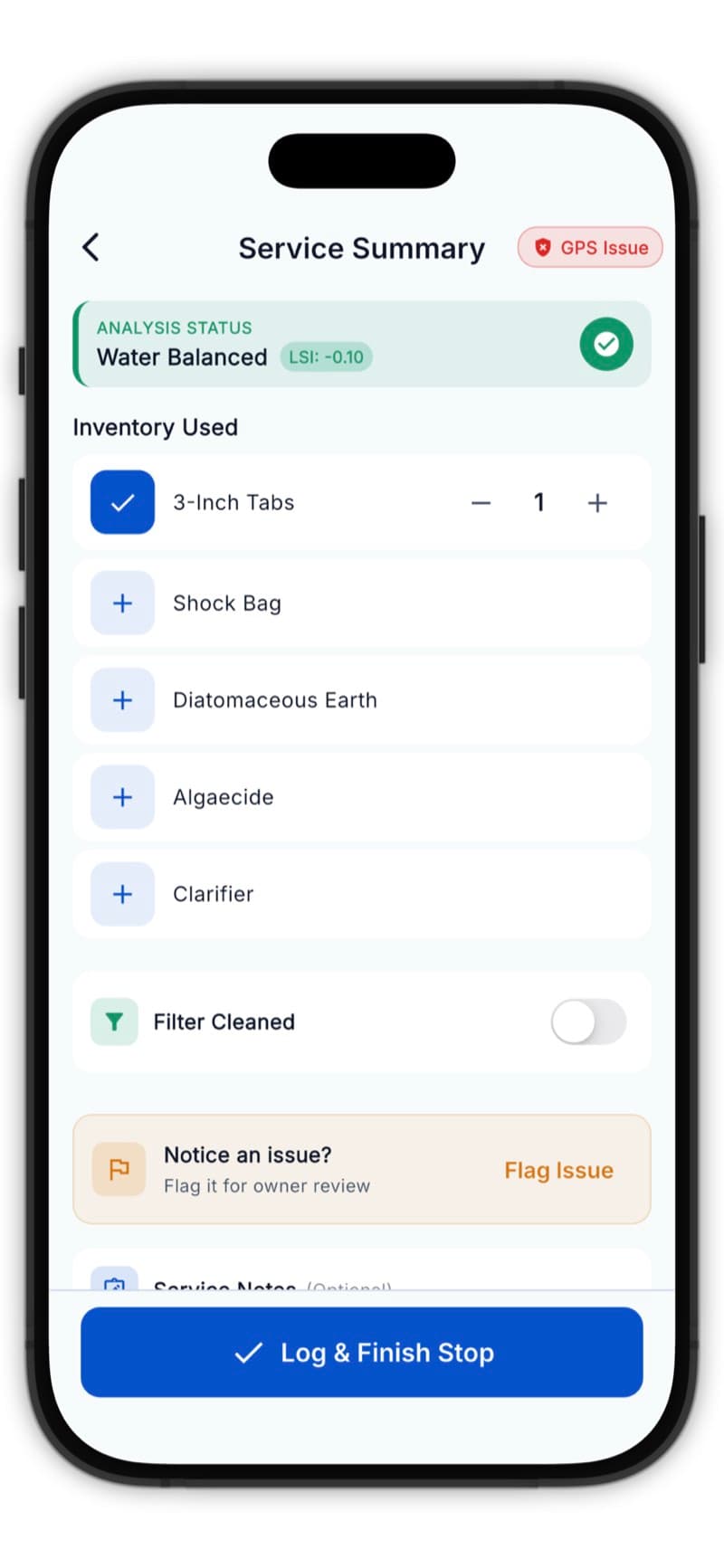
LSI Score Meanings
| LSI Range | Status | What It Means |
|---|---|---|
| Below -0.3 | Corrosive | Water will dissolve surfaces, damage equipment |
| -0.3 to +0.3 | Balanced | Ideal range, water is stable |
| Above +0.3 | Scaling | Water will deposit minerals, cloud up |
Visual Indicators
- Blue (Corrosive) - Water needs calcium, alkalinity, or pH increase
- Green (Balanced) - Perfect! Water is stable
- Orange (Scaling) - Water needs acid or pH adjustment
How LSI is Calculated
The LSI formula considers:
- pH
- Temperature
- Calcium hardness
- Total alkalinity
- Total dissolved solids (TDS)
PoolOps calculates this automatically - no math required!
Chemical Dosage Recommendations
After entering readings, the app shows:
Recommended Actions
- What to add (e.g., "Add muriatic acid to lower pH")
- How much (calculated for the pool's volume)
- Why (explanation of the adjustment)
Dosage Calculations
The app uses the pool's volume (in gallons) to calculate precise amounts:
- Liquid chlorine (gallons)
- Muriatic acid (ounces)
- Sodium bicarbonate (pounds)
- Calcium chloride (pounds)
- And more...
Always follow safety guidelines when handling chemicals. Never mix chemicals together.
Recording Chemicals Added
On the Dosage screen:
- Select the chemical type from the dropdown
- Enter the amount added
- Choose the unit (oz, lbs, gallons)
- Tap Add to record
You can add multiple chemicals per service.
Tips for Accurate Readings
- Test at elbow depth - Not surface or bottom
- Away from returns - Avoid areas near jets
- Same time of day - Consistent testing improves accuracy
- Fresh reagents - Replace test kit chemicals annually
- Clean vials - Rinse with pool water before testing
Common Scenarios
High pH, Low Chlorine
- Add muriatic acid first
- Wait 30 minutes
- Then add chlorine
Cloudy Water
- Check filter pressure
- Test phosphate levels
- Consider clarifier or flocculant
Green Pool
- Shock treatment needed
- May require multiple visits
- Flag as an issue for customer communication
Use the Notes field to document unusual conditions and treatment plans.